
Appearance
Getting started
Requirements
- Node 22.13 or newer —
node:sqliteis behind a flag before that. - Nuxt 4.
Install
bash
npm install nuxt-monitorbash
yarn add nuxt-monitorbash
pnpm add nuxt-monitorts
// nuxt.config.ts
export default defineNuxtConfig({
  modules: ['nuxt-monitor'],

  monitor: {
    auth: { password: process.env.MONITOR_PASSWORD },
  },
})
Start the app and open /_monitor. In development it opens straight away — no password needed. Sign in as admin in production.
No password, no dashboard in production
Every route answers 404 while no credentials resolve — not 403, which would confirm there is something worth attacking. Errors are still collected, so you can set a password later and find them waiting.
Check that it works
The fastest confirmation is an error you caused on purpose. Add a route that throws:
ts
// server/api/boom.ts
export default defineEventHandler(() => {
  throw new Error('a deliberate failure')
})
Request it once, then open the dashboard. You should see one issue, with the stack resolved to server/api/boom.ts and the failing line shown in context.
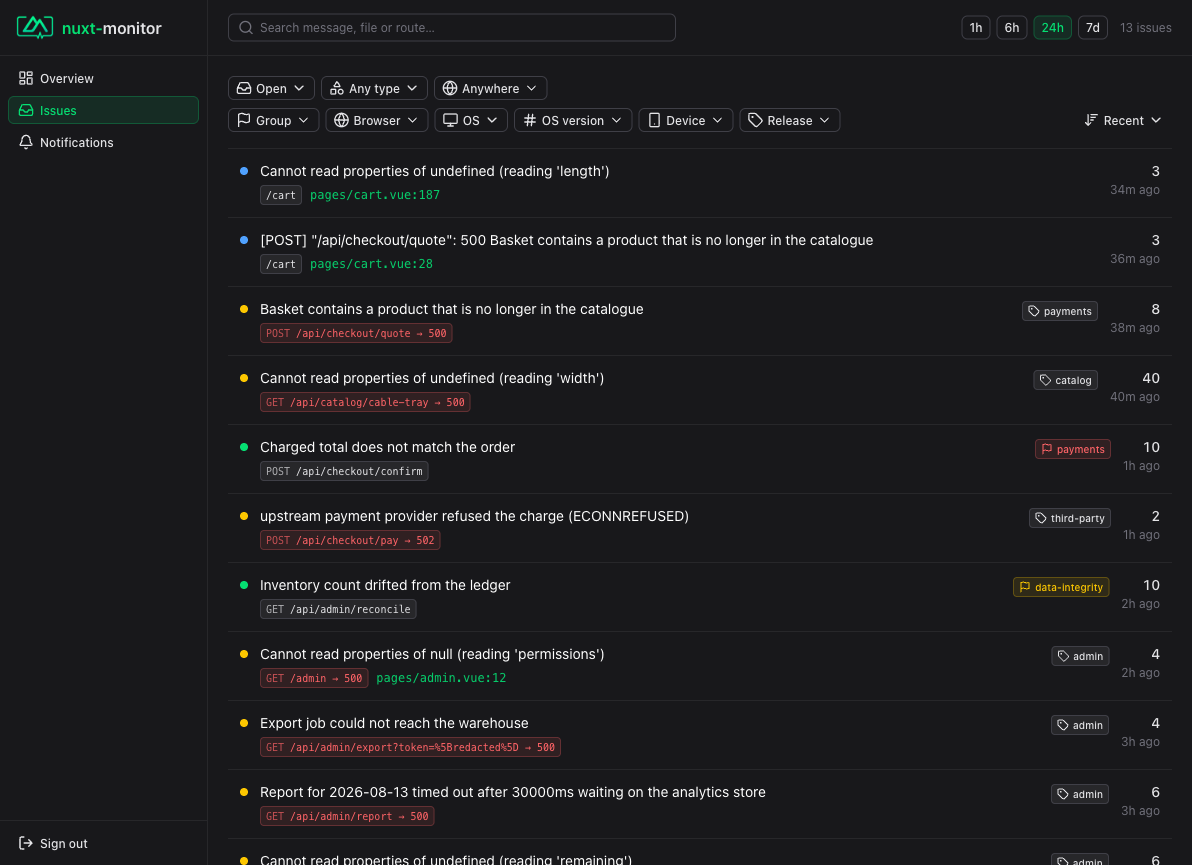
Server and client errors land in one list, filterable by side, browser, OS and device.
If the issue appears but the frame is not resolved, that is a sourcemap problem rather than a collection problem — see Sourcemaps.
What is collected
Server errors — Nitro's error hook, which every failure path funnels through: handlers, plugins, cached functions, unhandledRejection and uncaughtException.
Client errors — a browser plugin posting to /_monitor/api/ingest. It listens on vue:error as well as the window handlers, since Nuxt drops its own Vue error handler once the app hydrates. Alongside each one it sends a short trail of what led up to it — navigations, requests and the labels of what was clicked.
Bodies of failing requests — the response body by default, the request body if you turn it on. See capture, and read Privacy first if you are thinking about the request half.
Request counts — for every request, failing or not: a route shape, a method and a status class, and never a body or a header. They give the error count a denominator: ten failures out of ten requests and ten out of a million are different situations.
Only 404 and 429 are ignored by default; see ignore. Everything else is recorded, because a status code is a claim an application makes about itself and applications make it inconsistently — plenty of APIs answer 400 or 422 for "your own frontend sent nonsense", which is a bug.
Where the data goes
A single SQLite file at .monitor/monitor.db. Add .monitor to .gitignore. Nothing is sent anywhere — no account, no DSN, no upload step. For PostgreSQL or MySQL, see Storage.